
New Website Not Showing on Google: A Complete SEO Guide for Promoting New Sites (2025)
You’ve prepared everything: a shiny new website, a design that knocks it out of the park, and all the content you wrote feels like a million dollars. You’re sure that from the moment you hit “Publish”, customers will start flowing in. So you go to Google, type in your business name, search for the services you offer, but… nothing. Your site simply doesn’t exist. It’s as if it vanished into the vast space of the internet. It feels like pouring your heart and talent into a sealed bottle you threw into the sea. We know this despair well, and we see it again and again in the clients who come to us.
But today we’re telling you – throw that despair away. It doesn’t serve you. Instead, let’s understand together why this happens and exactly how you’re going to fix it, step by step. It isn’t magic – it’s systematic, correct work. Let’s begin.
Step 1: Verify the problem – does the site really not exist? (Image from a site)
Before you rush to check complex settings, let’s start with a simple, quick check to make sure there’s no mistake.
- Using the
site:command on Google: Open Google and type the following command:site:your-site-name.com. For example:site:wsoagency.com. If you see pages from your site in the search results, Google knows it. If not, it isn’t indexed yet. - Checking other search engines – a real case study: Does your site appear on Bing or other search engines? Sometimes Google’s indexing process takes longer. If the site appears on Bing, you understand it’s perfectly fine and you just need to give Google a bit more time. Here’s an example from a real case we encountered with one of our sites:
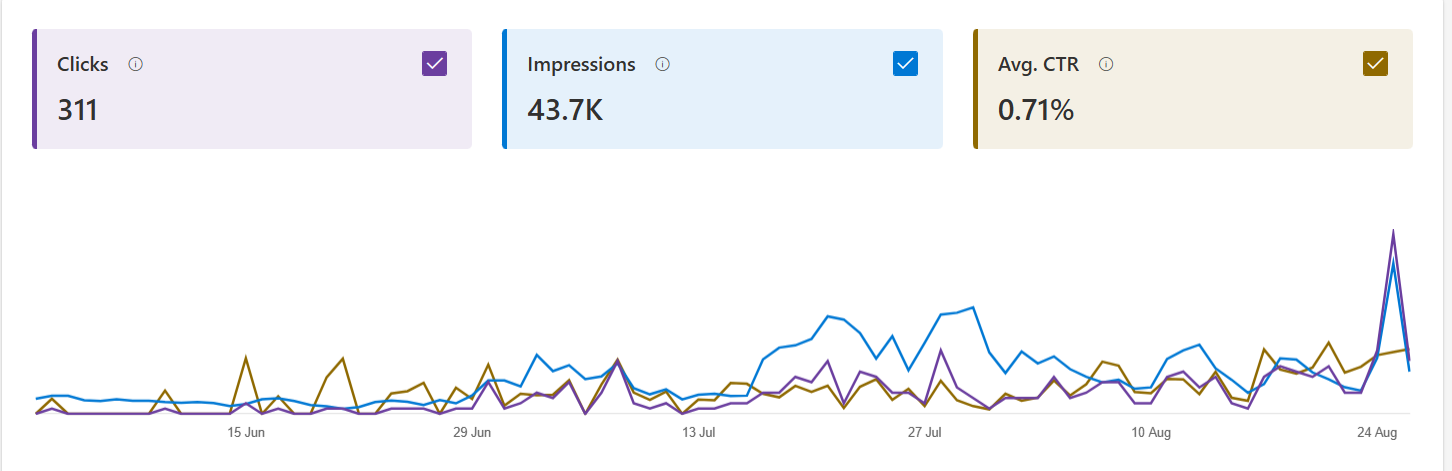
As you can see in the chart, for a new site of ours in an international niche, when we checked with the
site:command, Google didn’t show all the indexed pages (only 10). But when we at WSO checked on Bing, we found a completely different picture. The data showed that Bing had crawled the site and was displaying it in search results, and the impressions, clicks and CTR data on Bing were positive. The fact that the site was already getting some traffic from Bing made it clear to us that the problem wasn’t a serious technical one, but related to the way Google crawls and indexes the site. It reinforced our understanding that you just need to give Google the right push, and that the site isn’t technically “dead”.
If both checks (including Bing) showed that the site can’t be found, it’s time to move on to the next steps.
Step 2: We make sure Google knows you exist
The first thing you do is make sure Google is aware of your site. If Google doesn’t index it, it simply can’t appear in the search results.
- Google Search Console (GSC): The first and most critical step is to open a free Google Search Console account. It’s Google’s official tool that shows you how it sees your site. There you can check whether the site has been indexed, discover technical problems and send it requests to index pages.
- Sitemap: A sitemap is like a map that shows Google all the paths on your site. Create a sitemap file (most content management systems create it automatically), submit it to GSC, and Google will understand more quickly how to crawl your site.
- Robots.txt file: Make sure the robots.txt file isn’t accidentally blocking Google from entering your site. This file tells Google’s bots where they’re allowed to crawl and where they aren’t. An error in it can cause Google to ignore the site completely.
Step 3: Put your house in order: basic on-page optimization
Once you’ve made sure Google can crawl the site, it’s time to make sure it understands what the site is about. On-page optimization includes all the actions you take within the site itself to improve rankings.
- Title and meta description tags: Every page on the site needs a unique, attractive title tag and meta description tag. These are the first things people see in the search results. Make sure to include your main keywords in them naturally.
- Loading speed and mobile optimization: Google gives priority to sites that load quickly and are perfectly adapted to mobile devices. Use tools like Google’s PageSpeed Insights to check the site’s performance and fix problems.
- The right URL structure: Make sure the page addresses (URLs) on the site are short and clear, and contain the keyword. For example:
https://wsoagency.com/seo-guideis far better thanhttps://wsoagency.com/page_id=2345.
Step 4: Content, content, content: the undisputed king
Content is the reason people come to your site. Without quality, relevant, up-to-date content, Google won’t see you as an authority in the field, and your rankings will be low accordingly.
- Content strategy: Before you start writing, think about who your customers are and what problems they’re trying to solve. Write articles and guides that provide real value and answer their questions.
- Keywords: Naturally include the keywords people search for. Use secondary keywords (LSI keywords) and related phrases to cover the topic in depth.
- Long, comprehensive content: Many studies show that Google prefers long, comprehensive articles (over 1,000 words) that provide more value to the reader.
- Readable writing: Use subheadings, bulleted lists and images to break up the text and make it easy to read.
Step 5: Building authority: off-page optimization
Even if your site is perfect on the inside, Google still needs to understand that other users find it trustworthy. This is where off-page SEO comes in, which mainly involves external links.
- Internal links: Link between different pages on your site. This helps visitors and Google’s bots navigate the site and passes “power” between pages.
- External links (backlinks): A link from another site to yours is like a “vote of confidence”. The more leading sites in your field link to you, the more Google understands that your site is authoritative and trustworthy. The best way to get links is to create content so good that people will want to link to it naturally.
Common questions we get from clients
How long does it take for a new site to appear on Google? It can take anywhere from a few days to a few weeks. For a competitive phrase, the process can be longer. Consistent work over time is the key.
Do I have to use Google Search Console? Yes, it’s a must. It’s Google’s most basic tool, and without it you’re working “with your eyes closed”.
How long until I see results from new articles? Articles take time to get indexed and build strength. You’ll usually start seeing significant organic traffic a few weeks to a few months after publication, depending on the competition and the quality of the article.
Summary and conclusions
Appearing on Google for the first time is only the beginning. To stay there and climb higher, you need to understand that SEO is an ongoing process. If you apply the steps in this guide, you’ll build a stable, strong foundation that will help your site leap forward.
Organic SEO is work that requires knowledge, experience and time. If you want to make sure your site is handled professionally and efficiently, we invite you to contact us. The WSO team will be happy to help you understand the data, build a personalized SEO strategy and put your business where it deserves to be – at the top of the search results.
Want to hear more about how we can help you promote your site? Contact us today at WSO.