How to Prevent Indexing of Filter Pages – Real Control of Technical SEO for Large Sites
In the real world of SEO, the problem is almost never a “lack of content”.
The problem is too many pages.
Filter pages are one of the quietest and most expensive causes of damage to organic performance. They’re created unintentionally, multiply without control, and load Google with hundreds and sometimes thousands of URLs that have no real search value. In many cases, site owners discover the problem only when rankings stall, indexing slows down, or Search Console starts to look like a damage report.
At WSO, we treat filter pages not as a one-off problem, but as a strategic issue that combines technical SEO, site structure and a direct connection to business performance.
What filter pages are and why they’re created on almost every site
Filter pages are a natural product of dynamic sites.
E-commerce sites, real estate sites, price comparison sites, content sites with complex categories and even brochure sites with advanced search – they all generate filters.
Common examples:
-
Filtering by price, color, size, brand
-
Filtering by area, property type, number of rooms
-
Filtering by date, tags, technical attributes
Every such combination generates a new URL.
Once there’s no control, every combination becomes an independent page that Google can crawl, index and get confused by.
The real problem: not the filters themselves, but their indexing
Filters are an excellent UX tool.
But SEO doesn’t reward user convenience at the expense of hierarchy and order.
When filter pages get into the index:
-
They compete with important category pages
-
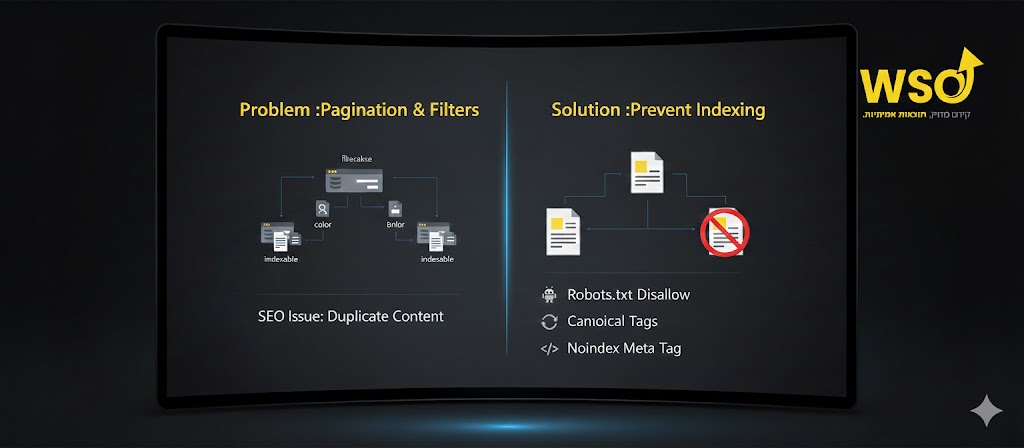
They create hidden duplicate content
-
They waste crawl budget
-
They dilute internal authority
-
They signal indecision to Google
In most cases, no one really wants a page like “black shoes, sizes 42 to 44, priced 300–350” to rank.
It exists to help the user, not to drive organic traffic.
Crawl budget isn’t a myth; it’s a limited resource
On small sites you can ignore it.
On medium and large sites, that’s an expensive mistake.
Google has limited resources for each domain.
The more unnecessary URLs there are:
-
Important pages are crawled less frequently
-
Content updates are picked up more slowly
-
New pages enter the index late
Filter pages don’t just “not contribute”; they steal attention from pages that are supposed to bring traffic and conversions.
Why blocking in robots.txt alone is almost never enough
This is one of the most common mistakes we see.
robots.txt prevents crawling, not indexing.
If a URL is already known to Google through internal or external links, it can appear in the index even without being crawled.
In addition:
-
Sweeping blocks can prevent Google from understanding the site’s structure
-
Sometimes pages that are important for SEO get blocked too
-
There’s no control at the parameter level
robots.txt is a blunt tool.
Filter pages require precise work.
Using noindex correctly: when, how and why
The noindex tag is one of the most effective tools for preventing filter pages from being indexed, when it’s used correctly.
The principle:
-
The page exists
-
The user sees it
-
Google can crawl it
-
But it doesn’t enter the index
That way:
-
User experience is preserved
-
The link structure isn’t harmed
-
The index stays clean
The challenge isn’t the technology, but the decision:
which filters should never be in the index, and which perhaps should.
Not every filter should be blocked – sometimes it’s actually an asset
One of the most important points:
some filters have real search value.
For example:
-
“3-room apartments for rent in Tel Aviv”
-
“Women’s running shoes”
-
“Hotels in Rome near the Colosseum”
In cases like these, the filter is really a hidden category.
The mistake is blindly blocking everything.
At WSO, we build a clear map:
-
Filters with search intent → dedicated pages
-
Operational filters → noindex
-
Problematic filters → a mechanism that prevents them in advance
This isn’t a technical action. It’s a strategic decision.
Canonical as a partial solution – and when it’s dangerous
The canonical tag is used to declare a preferred page.
It’s sometimes used to “point” from a filter to a category page.
That can work, but:
-
Google doesn’t have to respect the canonical
-
Imprecise use creates confusion
-
Sometimes you end up with thousands of pages all pointing to the same target
Canonical is a delicate tool.
In some cases it supports noindex; it doesn’t replace it.
Parameter management in Search Console: why it’s no longer enough
In the past, Search Console’s parameter management tool was a common solution.
Today it’s much less relevant.
Google itself recommends:
-
Not relying on it as the only solution
-
Using it only in very specific cases
Real control must be at the level of the site itself:
in the code, the logic and the hierarchy.
Internal link structure is part of the problem and the solution
Filter pages enter the index not only because they exist, but because they’re linked to.
When:
-
Menus
-
Breadcrumbs
-
“Popular filter” areas
link to filters freely, Google understands that they’re important.
Part of doing it right is:
-
Reducing links to irrelevant filters
-
Controlling which filters get permanent links
-
Separating navigation for the user from hierarchy for search engines
JavaScript and AJAX: a solution or a trap
Many sites try to “get clever” and move filters to JS only.
Sometimes it works, sometimes it blows up.
Google can run JavaScript today, but:
-
Not always
-
Not always immediately
-
And not always the way you expect
JS-based filters can be a solution, but only as part of an overall plan.
Not as a band-aid.
Why filter pages hurt conversions too, not just rankings
This is a point few people talk about.
When a user lands on a filter page:
-
There’s usually no clear marketing message
-
There’s no proper hierarchy
-
There’s no tailored content
-
There’s no natural call to action
In other words, even if there’s traffic, it doesn’t always convert.
A page that wasn’t built as a landing page doesn’t behave like one.
Controlling indexing is also controlling the user’s journey.
SEO that moves the needle, not just the positions
At WSO, we don’t see filter pages as a small technical mistake.
We see them as a test.
The test is:
-
Does the site know how to decide?
-
Is there a clear hierarchy?
-
Does every URL in the index justify its place?
Sites that succeed over time aren’t the ones with the most pages, but the ones that know exactly which pages should appear, and which are better left behind the scenes.
Controlling indexing isn’t a one-time action.
It’s the result of thinking, planning and a deep understanding of how SEO is supposed to serve the business – not just the algorithm.
Interested in a review of your site? Contact us today.